

How to Use Cryptocurrency Yahoo Finance to Track Market Trends
Understanding crypto charts and price data can be really confusing if you’re new to them. Think of Yahoo Finance as a simple, user-friendly guide to help you navigate that confusing world. In this guide, we’ll use “Cryptocurrency Yahoo Finance” like a magic tool to help you track Bitcoin, Ethereum, and other popular cryptocurrencies. We’ll explain everything clearly and use real examples. You’ll learn how to find your favorite crypto, read its chart, set alerts, and keep up with the latest trends. By the end of this guide, you’ll see why Yahoo Finance with its listings of over 9,000 cryptocurrencies, including Bitcoin and Ethereum—can be your helpful companion in the adventurous world of crypto markets.
Getting Started with Cryptocurrency Yahoo Finance
Imagine Yahoo Finance as a friendly guide dog for the crypto-curious. It barks out price updates, shows charts, and even tips you about market news. In 2017 Yahoo Finance added a dedicated crypto section, and today it lists thousands of coins. First, head to Yahoo Finance and sign in or create an account it’s free. Once you’re logged in, you’ll see a search bar at the top that’s your crystal ball to look up any cryptocurrency. We’ll use it in the next section to find Bitcoin (ticker BTC-USD) or Ethereum (ticker ETH-USD).
What Is Yahoo Finance’s Crypto Tracker?
Basically, Yahoo Finance’s crypto tracker is a part of the site and mobile app that shows live price data, charts, and news for cryptocurrencies. It’s similar to the stock pages, you get a current price, a historical chart, and tabs for things like Historical Data, News, and Analysis. Yahoo even has interactive charts so you can zoom in on trends All of this is aggregated from reliable data feeds, so you don’t have to manually check each coin’s exchange.
Signing Up and Navigating the Interface
Signing up is easy: click “Sign in” and use your Yahoo account or email. Once in, the interface is pretty straightforward. You’ll notice tabs like My Portfolio, Watchlists, Alerts, etc. These let you track coins over time. For example, adding a cryptocurrency to your portfolio or watchlist means you can check it quickly without searching again. The “Add to Watchlist” button acts like saving a bookmark for that coin. This portfolio tool gives you a snapshot: total cost basis, percentage gain, and more, just like tracking stocks.
Searching for Cryptocurrencies on Yahoo Finance
The first step in tracking crypto is simply finding it. At the top of Yahoo Finance is a big search box. Here’s how to use it:
-
Type a Coin Name or Symbol: If you want Bitcoin, try typing “Bitcoin” or its ticker symbol BTC-USD (which means Bitcoin priced in US Dollars). For Ethereum, use “Ethereum” or ETH-USD. Yahoo’s auto-complete will suggest the right crypto as you type.
-
Select the Correct Result: Click on the dropdown suggestion that matches the crypto (be careful: some tickers are similar). Choosing it opens that coin’s summary page.
-
Confirm Details: On the coin’s page, you’ll see the name (e.g. Bitcoin USD), current price, daily change, and market cap. It’s your crypto cockpit.
Example: Looking Up Bitcoin’s Data
Let’s say you type BTC-USD and press Enter. You land on Bitcoin’s page.
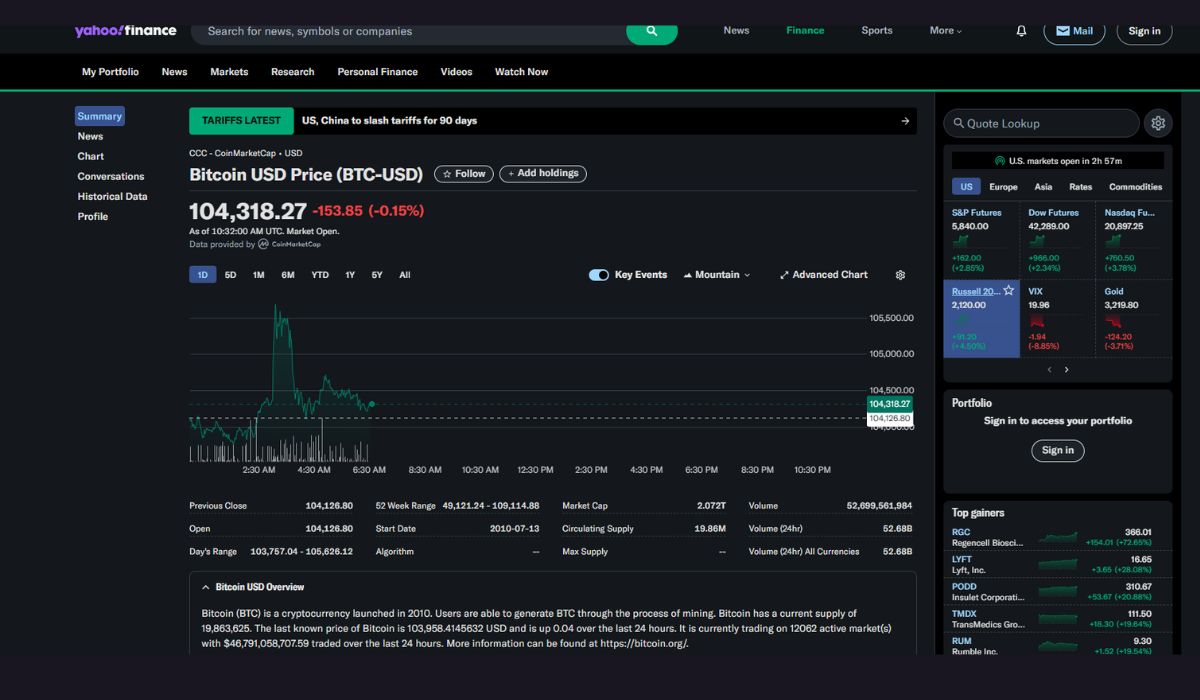
The Summary tab shows the current Bitcoin price in USD, up/down percentage, volume, and more. You also see a chart of price over time. Below, there might be a breakdown (Open, Previous Close, Market Cap, Circulating Supply, etc.). This is where Yahoo Finance becomes concrete, one glance, and you know the current state of Bitcoin’s wild ride.
Adding Cryptos to Your Watchlist (Portfolio)
Once you find a coin page, make life easier by clicking “Add to Watchlist” or “Add”. This saves it in your Yahoo Finance portfolio. Now when you go to My Portfolio, your chosen cryptos all sit in one list with their latest prices and gain/loss. Think of it as a digital sticker chart: your favorite coins are pinned on it for quick reference. You can add multiple watchlists too, say one for Bitcoin and one for Meme Coins. This way, tracking is a breeze, you don’t have to search for them every time.
Reading Crypto Charts on Yahoo Finance
Now the fun part, charts! The chart is a visual story of price action. Yahoo Finance offers interactive charts with plenty of bells and whistles. Here’s how to use it like a pro:
-
Timeframes: On the chart, pick different views. For example, 1D (today), 5D, 1M (month), 1Y (year), or “Max” for all data. This zooms in or out on price movements. A 1-month chart shows you recent trends, while a 5-year chart shows big swings like bull runs or crashes.
-
Chart Types: Use the dropdown to switch between line charts or candlestick charts. Candlesticks are like little price rockets: a green rocket candle means the price rose that period; a red one means it fell.
-
Compare: You can overlay another asset. For example, compare Bitcoin (BTC) to gold or S&P 500 by adding a symbol. This shows how cryptos move relative to other markets.
-
Indicators: There are built-in indicators on the mobile app or Yahoo’s chart interface such as moving averages or RSI. For beginners, this might be advanced, but it’s there when you grow more curious.
Customizing Timeframes and Indicators
Once the chart is displayed, try clicking different time ranges. If Bitcoin is zooming up on a 1-month view, switch to 5 years to see if it’s still low by historical standards. This perspective helps you decide if a price is “hot” or “cheap.” If you’re the cautious type, you might add a 50-day moving average line by selecting “Technical Analysis” or similar chart settings available on Yahoo’s site and app. These overlays can clue you into trends, is the price consistently above or below the moving average?
Understanding Candlestick Patterns and Trends
For a beginner, candlesticks might look like a wizard’s puzzle. But think of them simply, each candle covers a time period say, one day. A green candle means the close price was higher than the open price (price went up); a red candle means it went down. Long candlesticks imply big swings, short ones imply stability. If you see a series of green candles climbing like stairs, that’s an uptrend. Yahoo Finance’s charts will even highlight 52-week highs/lows, so you can see if the coin is near record territory. This visual trend analysis helps you know “Are we in a crypto bull run?” or “Is this a crash?”.
Read More: Earn Easy Profits Using These Tricks of Technical Analysis for Cryptocurrency
Setting Alerts and Notifications
One of my favorite Yahoo Finance tricks is the price alert. It’s like setting an alarm clock for crypto, you tell Yahoo “ping me when Bitcoin hits $60,000” and it will.
Creating Price Alerts on Yahoo Finance
To create an alert, first sign in to your Yahoo account. Then on the crypto’s page, look for a little bell icon or an “Alerts” option (usually near the price or in the menu). Click it, and you’ll see options to set a new alert. For example, set an alert for when the price goes above or below a certain threshold. Enter your target price (e.g. “$60,000”) and how you want to be notified (email or push notification on your phone). Now, you can close the app or sleep, Yahoo will wake you if Bitcoin darts across $60k! This feature works for other coins too, and even for portfolio changes. Yahoo’s system lets you set alerts on individual assets or entire watchlists.
Types of Alerts (Price Targets, News)
Besides price targets, Yahoo Finance also offers news alerts. For example, you could set an alert for any news article about Bitcoin or a crypto sector. If you follow crypto at large, you might set an alert on a topic like “cryptocurrency.” That way, you get a notification when important news e.g. “Bitcoin halving announcement” drops. Alerts for specific coins are the most common. Remember, alerts on Yahoo Finance can be customized for various events, and sent via email or push, as Uptrends note. It’s very user-friendly. once it’s set, you can relax and let the app do the watching.
Tracking News and Market Trends
Went on Yahoo Finance:
1) Founders just want to build in the US
2) We need clear regulation for tokens
3) We need to end the crypto crackdown
4) Crypto users now represent all Americans
5) Risk assets will keep sendingFirst time on TV.
Thanks @thebradsmith for having me. pic.twitter.com/cuPUnYGvG1
— Yano 🟪 (@JasonYanowitz) November 12, 2024
Charts show the past and present, but news and trends help predict the future. Yahoo Finance has a Crypto News section and even user forums. Let’s break it down:
Yahoo Finance’s Crypto News and Discussion
On a coin’s page, you’ll find a News tab or a link to “Latest Crypto & Bitcoin News. This aggregates articles from Yahoo’s editors and partners. You get headlines like “Bitcoin surges 10% after Fed announcement” or “Ethereum’s latest upgrade explained.” It’s a quick way to stay updated. There’s also usually a Discussion or Messages tab where users chat. Reading these can be like listening to a crypto clubhouse: people share opinions, rumors, or insights. While take it with a grain of salt, it’s part of the market’s pulse. Remember, Yahoo Finance is a major platform, it’s trusted enough to list 9,000+ coins, so their crypto news section is pretty reliable.
Analyzing Volume, Market Cap, and Sentiment
Apart from news, Yahoo Finance shows stats to gauge trends. On the Summary page, check things like Volume (24h volume) and Market Cap. A sudden spike in volume big bars on the chart or a large number on page often signals big moves or news. If Bitcoin’s market cap jumps, it usually means price jumped (since market cap = price × coins in circulation). Yahoo also sometimes shows a “Percent Change” over 24h. If Bitcoin is +5% today, that’s a trend sign. For broader sentiment, there’s often a “Crypto Screener” where you can sort coins by biggest gainers or losers. This is like a leaderboard of trending coins, if Dogecoin is on fire today, it’ll be near the top. All these data points from Yahoo Finance help paint a picture of the market mood.
Final Thought
Yahoo Finance is more than just stocks it’s a powerful free tool for crypto tracking. By using its search to find coins (like BTC-USD for Bitcoin), viewing interactive charts, adding favorites to a watchlist, and setting alerts, even a crypto newbie can follow market trends with confidence. The platform’s strength lies in its friendly interface and comprehensive data, it covers thousands of cryptocurrencies and gives real-time updates. Whether you’re watching Bitcoin breaking $100K or Ethereum’s next move, Yahoo Finance has your back with charts, news, and notifications. Start your crypto journey here, and let Yahoo Finance be the compass guiding you through the volatile seas of digital currency.
Frequently Asked Questions (FAQs)
-
Q: How do I search for cryptocurrencies on Yahoo Finance?
A: Simply use the search bar at the top of Yahoo Finance. Type the coin’s name or ticker symbol (for example, “Bitcoin” or BTC-USD for Bitcoin, “Ethereum” or ETH-USD). Select the correct result from the dropdown to open its page. -
Q: How can I set up price alerts for crypto on Yahoo Finance?
A: First, sign in to your Yahoo account. On a cryptocurrency’s page, click the little bell icon (or look for “Alerts”). Enter your target price or percentage change and choose how to be notified (email or mobile push). Yahoo will notify you when the coin hits that price. -
Q: Are all cryptocurrencies available on Yahoo Finance?
A: Yahoo Finance lists thousands of cryptocurrencies – in fact, over 9,000 coins including major ones like Bitcoin and Ethereum. Most popular coins and many altcoins are covered. If your coin isn’t listed, you might find a similar ticker or use a specialized tracker for very obscure tokens. -
Q: Is using Yahoo Finance to track crypto free?
A: Yes! The basic Yahoo Finance website and app are free. You can view live crypto prices, charts, and set basic alerts without paying. There is a paid Yahoo Finance Plus plan for advanced features, but all the tracking and alerts we discussed are available in the free version. -
Q: What do the crypto price charts on Yahoo Finance show?
A: The charts plot the cryptocurrency’s price over time. You can customize the timeframe (1 day, 1 month, 1 year, etc.) and chart type. Yahoo Finance uses candlestick charts, where each candle shows open and close prices for that period. By reading these charts, you see if a coin is trending up or down.
Stay informed with daily updates from Blockchain Magazine on Google News. Click here to follow us and mark as favorite: [Blockchain Magazine on Google News].
Disclaimer
Blockchain Magazine publishes content submitted by third-party agencies, partners, and clients. Any such posts are categorized and tagged accordingly:
- Sponsored Content: Posts labeled as "Sponsored" are paid placements submitted by third-party agencies or clients. Blockchain Magazine does not endorse or express any views regarding the information contained in these posts. The opinions expressed belong solely to the respective authors and do not reflect the official policy or position of Blockchain Magazine.
- Press Releases: Posts labeled as "Press Release" are paid PR submissions provided by our partners and clients. These are published as received and should be considered as promotional content.
The information provided in such posts is strictly for informational purposes only and should not be interpreted as financial, investment, or professional advice. Blockchain Magazine does not recommend, endorse, or promote any specific products, services, or companies mentioned. Readers are strongly encouraged to conduct independent research and consult with a qualified professional before making any financial or investment decisions.
Additionally, all featured images accompanying such posts are intended as creative depictions of the subject matter. There is no intent to offend or misrepresent any individual, institution, or entity. If any content or imagery is found to be objectionable, please reach out to us at [email protected], and we will promptly review the concern.
About the Author: Anaya Malhotra





Get Blockchain Insights In Inbox
Stay ahead of the curve with expert analysis and market updates.